Your Safety Library2024-11-13T17:27:25-04:00

Your Safety Library

From software to safety these are the top questions

Videos

Body placeholder for text paragraph. A paragraph is a self-contained unit of text

Featured FAQs

Frequently Asked Questions

Check out the answers to frequently asked questions about the Smart Safety Lockout Tagout software program.

What if I don’t have WiFi near the machine?2025-12-23T10:33:19-04:00

No WiFi? No worries.

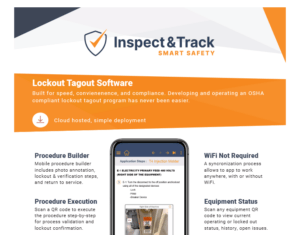
Our app works while disconnected from WiFi with a built-in synchronization process that seamlessly transfers your data back and forth between the mobile app and the web portal.

Is the Lockout Tagout software customizable?2025-12-23T10:02:25-04:00

Yes. Smart Safety Pro is a lockout tagout software designed to be customizable for any organization.

The LOTO admin tool allows program administrators access to add and edit data points specific to their implementation. This includes things such as energy type, energy feed, magnitude, and locations.

Smart Safety Pro lockout tagout software also includes a fully customizable facility and divisional hierarchy setup. This means that equipment is placed into departments, buildings, floors, and zones for optimal inventory management and assignments. Facility view options include card style and divisional.

For corporate implementations, plant sites are easily segregated including user access.

What is the benefit of mobile lockout tagout?2025-12-23T10:33:53-04:00

Mobile lockout tagout software offers visibility and insights into machine status that are not possible with a manual lockout tagout program. When a machine is locked out, the authorized employee scans a QR code, views each step of the procedure, and confirms on the screen that the step was completed successfully.

This offers two major benefits. First, it ensures that the procedure is followed correctly and includes documentation validation. Next, it changes the status of the equipment to “locked out”.

The Smart Safety Pro equipment dashboard displays real-time operating status of all equipment so that program managers verify details without walking out to the machine.

Is there version tracking included?2025-12-23T10:34:20-04:00

Anytime a lockout tagout procedure is unapproved, edited, and re-approved, it is assigned a new procedure ID number.

This offers version tracking when reviewing historical reports and makes it possible to see which lockout tagout procedure was used at any point in time.

From the Blog

Latest Stories & Articles

Our blog offers valuable information about LOTO regulations, LOTO compliance, LOTO program development, LOTO best practices, and LOTO software.

Go to Top